2015 part 1 – JMRI, S88-N and First Locomotive Conversion

January 4, 2015:

We are now into 2015 and the Christmas holidays are over. But for once, I have had a vacation. A real vacation with a lot of model train time. My wife is studying for her exams. So I have been able to spend half and whole days. The victories are multiple:

1. I have made decoder programming from JMRI work through IB-COM and IntelliBox II in close cooperation with a vertain mister Alain Le Marchand from somewhere in France.
2. At the same time, I have sneaked other corrections into JMRI: Control of turnouts via IB-COM / Intellibox II as well as an earlier patch for feedback from IB-COM / Intellibox II to JMRI, that by mistake only was implemented for Intellibox I.
3. I have done a small quick test with scripts in JMRI, to be exact an adapted version of BackAndForth.py.
4. I have built an S88-N-P and an S88-N module. Both works.
5. I have converted my old Märklin 3060 locomotive to DCC / digital.
6. I have been experimenting with my infrared diodes / photo transistor pairs.
7. I have made better and more specific plans for the extension of my prototype layout.

Ad. 1 and 2: The weekend before Christmas was used to implement as much decoder programming in JMRI as I could read from the RocRail source code. IT was enough to get “hole through”. I committed it as a patch and very fast got feedback from Bob Jacobsen (the perhaps most active person in JMRI) and from Alain Le Marchand.

Bob immediately implemented my patch and improved it regarding fit into the JMRI code base. In addition, he asked me back, why I had not enabled more ways of programming in JMRI than I had – for example PoM (Programming on Main), + wrote how I could enable that. According to my knowledge, IB-COM and thereby (I thought) Intellibox II does not support PoM. But Alain could inform me that at least Intellibox II does support PoM. It has however been proven true that IB-COM cannot do PoM.

During Christmas (while I was visiting my family in Jutland) Alain did some experiments, where he via the keys on his Intellibox II and using the LocoNEt monitor in JMRI produced documentation regarding which LocoNet messages that correspond to PoM programming. Besides, he tested my programming track programming. We had a lively conversation via e-mail and I could sit 100’s of kilometers away from my IB-COM and my PC and just using an iPad reach almost full understanding of these LocoNet messages.

Monday after Christmas and most of the Tuesday and Wednesday went with both getting PoM to work and to find out that programming track programming is not only one thing: There are three modes (direct byte, register and ???????), which have each their sub-command in LocoNet. I still don’t know what the difference is, but I somehow think register mode is for old decoders.

It was all quite a fun process. And it was a good and memorable cooperation with Alain, who was sending outputs from LocoNet Monitor, tested my changes and ended up committing it all into the JMRI code base. Alain is a registered JMRI developer even though he is not exactly an expert when it comes to Java. Alain was however simultaneously implementing support for F9 – F28 for both Intellibox I and II. A topic that I did not participate in, but where Alain did the ground work and Bob finished.

Ad. 3: There was not much time for Jython code. I hav not been writing a single line. But I did manage to find an hour or two to try out existing scripts. Generally it works great. I both made it sound the horn and run my BR216 back and forth between two sensors.

When I decide to do more, I guess I have to start by deciding what I want to achieve, i.e. To write a requirement specification. At this point, it is not quite clear to me what I want. Will I make something for my specific layout or shall it be generally usable? In the latter case, shall I invent my own data format to describe my layout or shall I use what already exists in JMRI? Shall my program run trains at random or according to schedules? How shall the program handle when I run a train manually? At least, the program must keep track of all trains and update their position on the layout (contrary to RocRail that only keeps track of the trains that RocRail is running).

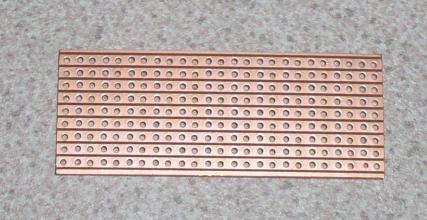
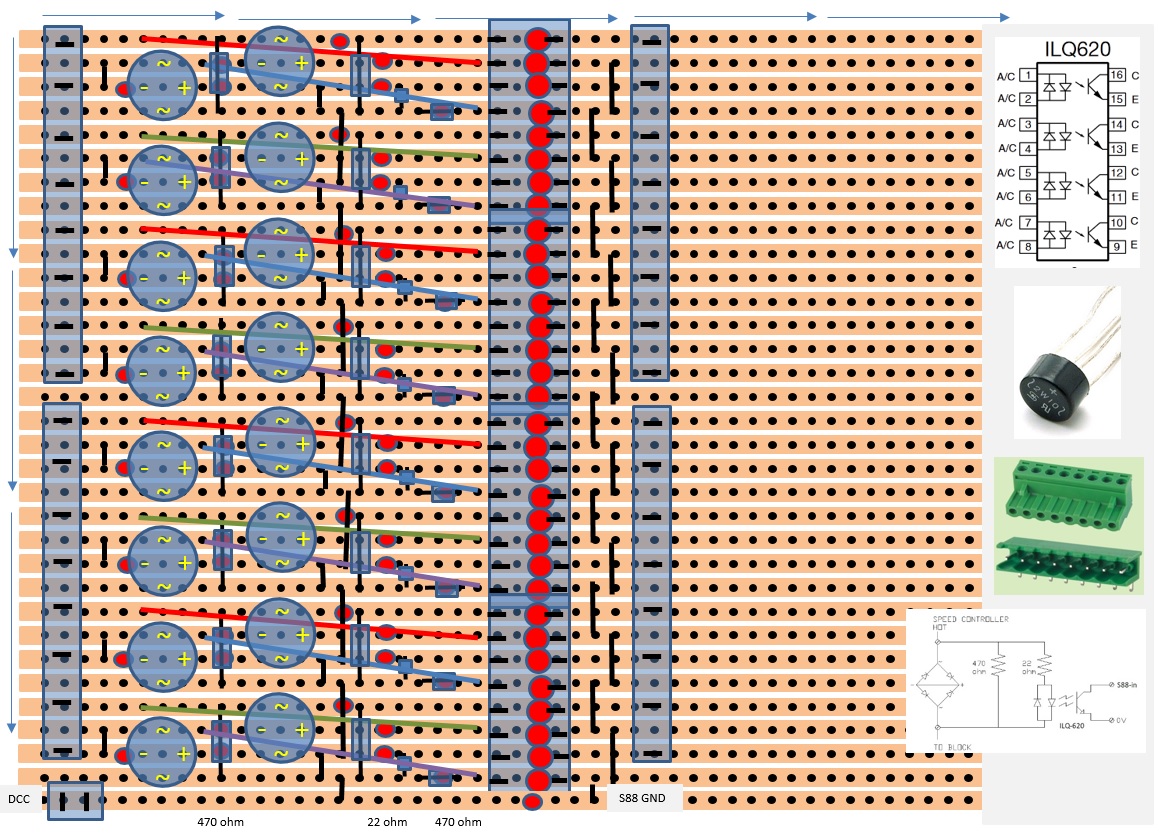
Ad 4: The day before new years evening, new years day and part of Friday, I was building an S88-N and especially the S88-N-P module. “Especially” because it took very long time to design and implement a veroboard layout and finally measure everything through with a multimeter before inserting the various integrated circuits. There were only two problems before everything worked: There was one place on the veroboard, where I had forgotten to disconnect (which I found out using the multimeter), and I had a bit of trouble programming the PICs. See more information under “Feedback modules”.

Ad 5: Saturday before new year was the absolute last opening day at Spor23 alias Taastrup Togcenter. And I was there to buy ESU LokPilot 4.0 decoders for my old Märklin locomotive and my Lima MR train. IT wasn’t exactly a sale. I spent 50 kroner more a piece than I would have at LokDoc. But I could go ahead with the rebuild right away: It did not take many minutes to disassemble the Märklin locomotive and throw the gearbox in a glass of terpentine to dissolve all old oil etc.. The biggest problem was to find the two screws that was holding the motor together. It was ccovered in dirt. For information: They are placed in the upper right and lower left corners.

It took a little longer to place an LED instead of the original bulb. But if I shall do it again, it will be much faster: A 5 mm LED fits in the hole where the bulb was sitting, and shall just be fixed with a drop of glue and then be equipped with a 1 kohm resistor.

Sunday (the last day before going back to work) I lubricated the gearbox with a drop of new oil and assembled the motor with a new magnet and a new front. It did not take many seconds. All parts were included in the Märklin conversion kit I bought in the spring of 2014. A 21-poled print for mounting the decoder came from an MFX decoder kit that I bought at the same time. The MFX decoder itself has been sitting in the BR216 for quite a while.

There are quite many wires on such a print. But I removed the ones that I didn’t need. Soldering the ones I actually needed and fixing the decoder print took a little time because I had never tried it before. But really, the whole thing is quite easy to do and took less than an hour. And another success was reality: The locomotive runs fine. The LED lights With a very white tone. But that is actually quite nice. It is no way blue. Just different from the old bulb that I am used to. But they are on the other hand probably too yellow.

The LokPilot 4.0 decoder proved to work far better on the programming track than the Märklin MFX decoder in mu BR216 locomotive. The Märklin decoder is quite impossible to program until MFX has been disabled. But there are no problems whatsoever with the LokPilot. That is except for the missing mention in the manual that the CVs controlling how light and AUX outputs shall function are only available if you write the value 16 in CV 31 and 0 in CV 32. Bat that doesn’t matter much, if you program from JMRI: It knows LocPilot and these kinds of peculiarities, so one shall just select the right pane and let it read all the decoders settings and then change whatever one wants changed (via checkboxes etc. with good labels instead of CV numbers) and finally write the changes back to the decoder. Et voila: My Santa Fe Locomotive does not light as brightly, dims the light when stopping and finally it has a more realistic max. speed. It could go at least 200 km/h, which is not suitable for a locomotive from 1950. And all changes are now stored inside JMRI as a backup.

Ad. 6: Sunday also gave a little time to play with the CNY 37, which is a little plastic thing with an IR diode and a photo transistor – one in each side and with an air gap between them. I calculated a resistor for the IR diod at 100 ohm, but decided to use 330 ohm. It works well.

Ad. 7: In between – especially during the evenings – I managed to make a list of track etc. that I need to buy plus I made a plan for how to fix the 55 cm extension board to the existing board.

2014 part 6 – From now on it is JMRI and S88-N

December 2014:

I still haven’t converted my old locomotive. I also haven’t manged to get my third switch to funtion 100%. And I am less happy with RocRail than previously. It is not 110% stabile. I cannot make my train go through a block without loosing speed. So I ought to be in a bad mood. But I don’t really care. It is a hobby and not a project. There is no deadline.

It is probably done in a jiffy, if I just start to convert the locomotive.

I am confident that I am going to get the switch working properly. I have found a different firmware for the decoder, which allows to adjust the two stop positions individually.  And if that is not enough, then I have already bought thinner piano wire, so that I can make built-in spring-effect, so that the servo can move all the way to the end position without breaking anything.

Note from later: The new firmware (version 3.5) have done the trick.

RocRail is worse. I have almost reached the conclusion that I will drop it and go back to JMRI or maybe I will end up buying a commercial program. See the separate page “JRMI or RocRail“.

I need another feeadback module. To do it simple, cheap and DIY, I have found S88N. I have bought a few printed circuit boards and a mini drill in order to drill holes in them. See separate page about that. I don’t need more feedback modules for the test oval, but I will when I am beginning to build a real layout.

I already have plans to expand the test oval. I just need to extend the base board half a meter, which might give me an opportunity to try to simulate a modular layout. More to follow.

Processed with Snapseed.
Plan for extension of prototype oval (made in Scarm).

2014 part 5 – RocRail (and a bit more about servos and turnouts)

Medio and ultimo October 2014:

New program for the PC: RocRail:

JMRI is out. For the moment at least.

It looks like RocRail is much more stable. With the new C-track, it did not take me long to get automated train control via RocRail.

However, it does not yet work with longer trains. Only with very short ones. And even then, it is very random where the locomotive stops in a block. And every now and then, I see de-railments due to RocRail dispatching a train through a turnout that is not done switching.

More turnout problems:

I am having mechanical problems with one of my three turnouts: The piano wire is jumping of.

This piano wire problem simply got to be solved. I probably have to take the servo of and bend a new piece of wire and mount it all from the beginning. That has to work.

Update: Yes – it works.

It seems to be extremely important that the “eye” on the wire in the turnout end is in line with the wire itself, as is the case with the new wire seen mounted on the turnout on the picture below. The old wire has the “eye” to one side of the wire, which made it jump of.

Processed with Snapseed.
Turnout with new wire. The old wire is on the table next to the turnout.

BUT: There is still a problem with the very same turnout. Even though the wire is no longer making trouble, the turnout does not switch perfectly. It moves a milimeter less than it should to one side. And then the train de-rails.

The problem seems to be that the mechanics is a tiny bit different in exactly that turnout. It requires a tiny bit more movement on the servo to push the mechanism to it’s endpoint. And Paco’s decoder only permits to adjust the total movement of the servo. Not the A and B end-points individually, which puts a demand on me to place the servo very precise in the middle so that the two end-points of the servo fits exactly with those of the turnout.

The problem gets worse, because my piano wire does not have any softness. It is a bit too stiff with it’s 1 mm diameter, and I have not managed to bend into a zig-zag shape. Had it been possible for the wire to bend a bit, if the servo movement was beyond the end-point of the turnout, it would have been a bit less of a problem.

Until further, I have been fiddling it to work by finetuning the length of the wire, so that the turnout just exactly functions. I need to find a better and easier solution before I go on “servofying” more turnouts.

But that will have to be later. For the time being, all my three turnouts are functional. I have in mind to use thinner wire, to bend the wire into a zig-zag shape and to use a different decoder or to modify the one, I am using. I might use this one: http://digital-bahn.de/bau_servo/sand4.htm or this: http://wiki.rocrail.net/doku.php?id=mgv136-en. I Have also been asking Paco about a modififed version of his decoder.

He is referring to this page: http://www.fucik.name/masinky/servo/. In addition, Paco has published his source code, and I think it is doable to introduce the additional configurability on my own. And I have also asked Fucik (the guy behind the other WEB site), if he is willing to publish his source code.

But as said, this is going to be later. Mr. Fucik has in the meantime answered, that his source code is here: http://usuaris.tinet.cat/fmco/colab/download/dcc4servo_v3_x.zip.

How do I get the train to stop at the same spot every time?

RocRail seems to stop the train at a random place in the block, where it is to stop.

According to the RocRail manual, it seems to require a sensor of a second type in each block. And thereby, I would have to make or buy a lot more sensors and feedback modules. That has to be considered closer. And not least: The RocRail manual has to be studied closer.

Another possible source of error is the rather primitive FX decoder in my test locomotive. Maybe, I should use a proper DCC decoder?

Ultimo october 2014:

The FX decoder has been substituted by an MFX, which is also capable of “speaking” DCC. It means that I am able to program the decoder and thus make better experiments with RocRail.

And it means that I all of a sudden has got 128 speed-steps instead of just 14. Just a small piece of advice that has cost me some time to reach: Disable the FX and MFX protocols, if you have a Märklin MFX decoder and a command station as my IB-COM, which may support several protocols, but which is natively a DCC command station.

I only succeeded to read CV values 1 out of 10 times, until I realized this.

My opinions about RocRail have become quite positive. Even if I am not entirely able to sure what is happening, I have through an evenings study of the RocRail manual, reading about blocks, routes and locomotives and by setting both brake and acceleration delay in the decoder to zero, become somewhat wiser. My locomotive is making some unnatural moves with the zero-delys. But I can now see, what happens:

RocRail uses 3 different speeds, that can be set in the locomotive property dialog box. I have configured these speeds as km/h, because I think that gives better possibilities to adjust different locomotives (once I get to have more than one on the layout) to stop exactly where I want them to stop at the platform.

After setting the speeds, it is also possible to configure which speed to use where. This is done in the block property dialog box.

I have however not yet found out how to make a locomotive start with anything else than cruising speed.

But I have reached apoint, where it is reasonably predictable where in a given block the locomotive stops. And that is still with only one sensor per block, i.e. A current sensor for the entire block length.

Speed Curve set-up:

The next thing is to adjust the speed curve in my BR216 locomotive, so that the real speed of the locomotive matches the speed RocRail thinks it runs at.

By doing the same thing with all ones locomotives and by using the same speed for all locomotives in the blocks where they are to stop, I think that I can get all locomotives to stop the on the exact same spot in a block.

The same benefit may be achievable by applying specific delays for each locomotive corresponding to the speed of the locomotives. But for now I will go with the speed curves and make all speedometers of my locomotives equal.

I Have found a description about how to do it here: http://www.dccwiki.com/Speed_Table. I am going to use it together with RocRails built-in speed measurement http://wiki.rocrail.net/doku.php?id=mvtrack-setup-en as well as my newly acquired possibility of programming the locomotive decoder as a real DCC decoder:  http://www.rjftrains.com/technical/60942_62_en.pdf and http://wiki.rocrail.net/doku.php?id=pt-en  With all this, I am sure, I will make the locomotive run reasonably acurately with the number of km/h I am asking it to – naturally converted into model size.

Data for a full-scale BR216 locomotive at DB is a max. speed of 120 km/h and a march speed of 80 km/h. So that is what my little train is going to be set up to as well.

First of all, I need to make sure that the motor regulation function in the decoder is set up correctly as described here: http://tonystrains.com/download/BEMF_PID_Intro.pdf.

At the last page, one can read the good advice that this can be controlled by letting the locomotive run at lowest speed, stop it by blocking it with a finger, making sure that the wheels spins with unchanged speed, remove the finger and controlling that the wheels are still turning with the same speed. If the speed changes at any time, something needs adjusting.

My BR216 seems to behave just as it should.

But the speed curve adjustments are not quite as easy as one should think:

The speed measurements in RocRail are working easily and gives fairly consistent values for the same speedstep- at least at lower speeds. And I decided not to spend more time on the recipe on BEMF from tonystrains.

The hint about stopping the locomotive with my finger seems to tell that the motor regulation already works reasonably well.

But a certain value in CV 67-94 does NOT seem to mean a certain speed in the corresponding speed step. That was however how I understood the text in dccwiki.

But there are more good advice on the Internet. Next up is this one: http://dcc-mueller.de/decoder/speedt_e.htm.

The speed table in my decoder (CV 67-94) is now back to default values and max. speed is adjusted to 120 km/h utilizing the trim CVs 66 and 95. A value of 60 was suitable.

The problem is however that the throttle scale is by no means linear, i.e. That half throttle should mean half speed.

I am trying with a new calculation in Excel. This time starting with the recipe form dcc-mueller, i.e. More or less the same curve as before in CV 67-94, but now scaled so that it goes all the way up to 255 (to utilize the full range), while I use VC 66 and 95 to limit the max. speed. Not that the curve in the first case gave a linear throttle, but it seems to work well with this new approach.


With the properties of the locomotive propertis in RocRail set to 128 speedsteps, max. speed 120 km/h and display in km/h, the speeds at the throttle fits within a few percent.

So I have learnt that before a locomotive enters my layout, I shall do the following:

1. Make sure the locomotive decoder has a programmable speed table.
2. Determine the real-world max. speed and march speed of the locomotive.
3. Set the throttle to 28 speedsteps and measure tthe speed of the locomotive at all speed steps up to the real-world max. speed.
4. Read the originale values for CV 67-94.
5. Adjust CV 66 and 95, so that the locomotive runs at its real-world max. speed at full throttle.
6. Use a spreadsheet to calculate which CV values that will give a linear speed curve and put these values into the speed table of the decoder.
7. Set up RocRail with as many speed steps as possible (i.e. 128 with a decent decoder) as well as with the locomotives real-world max. and march speeds. Use the same numbers for Vmid og Vlow for all lokomotives – for example 35 and 10.
8. Adjust the decoder to a small delay for both acceleration and braking. It cannot possibly be a good thing for the the mechanics of the locomotive that these settings are 0. I have set both (i.e. CV 3 and 4) to 2. Then at least it does not give a loud bang each time the locomotive starts and stops.

Update on point 5: I could not get it to work with my next locomotive. In stead I let CV 66 and 95 have a value of 0 and then I gave CV 67 – 94 correspondingly lower values.

Block timers and switch delay in RocRail:

By now I can get on with fiddling with timer values and other settings in the blocks, so that I can make all locomotives stop when it is all into the block, i.e. where the outgoing signal of the block is to be placed. I have read that it should be possible to obtain an accuracy of  +/- 2 cm. So that is my target.

A little advice: My swithes are servo-controlled and there is no feedback about when they have obtained their new position. It means that in RocRail, I have to check both “Switch time” and “Synchronize” as well as put for example 4000 ms into “Switch time” in the Interface tab in the Switch property dialog.

This makes the train wait 4 seconds so that all switches are set before the train starts.

What is next? Sounds? More automation? Equip more locomotives with decoder? RocRail can read texts out loud. What about a loadspeaker announcement?

It should be possible according to the “Speak to me” section at this page http://wiki.rocrail.net/doku.php?id=text-en&s%5B%5D=espeak. A number of additional programs must be investigated: espeak, playwav and balabolka including the Microsoft Speech Platform. Note the links to espeak and playwav.

The RocRail server can also play sounds along with actions. The player can be configured via the field “Sound Player” here: http://wiki.rocrail.net/doku.php?id=rocrailini-gen-en&s%5B%5D=mplayer

Or how about setting a locomotive to run automatically at a fixed route while others are running manually and even others utilizing the random automation in RocRail?

First of all, I have to more than the single locomotive. I have in fact bought one more and I have bought a conversion kit for the biggest and best of my very old Märklin locomotives to make it equipped with a DCC decoder and a 5-pole DC motor as opposed to the AC motor that it has originally. That was however the MFX decoder that i “borrowed” for the BR216.

In addition, I have a couple of old Lima locomotives. They are already equipped with DC motors. And one of them even has a collector shoe to make is suitable for 3-rail systems. So I am soon going to buy some decoders. But does it have to be the expensive solution with sound or should I buy the cheaper non-sound kind? I need to think.

See http://www.digital-train.com/digital_conversion.htm about conversion of locomotives. Or one of the many other recipes out there on the Internet.

2014 part 4 – Märklin C track

September/october 2014:

I am starting over – this time using Märklin C track:

Why bother more with trying to make the M track turnouts work with servos?

My layout shall not be built with M track anyway. So I have now bought the track from a new Märkling start set. There is just enough to my oval with a siding and another blind piece of track.


Controlling a Märklin C track turnout using a servo:

WIth the help of to tiny pieces of  plexiglass, a piece of 1 mm (later substituted by 0,6 mm) piano wire (modelskibet.dk) and some double sided tape (the best from Tesa), it was surprisingly easy to make the servos drive the turnouts:

Processed with Snapseed.
Turnout with servo drive

The piano wire is attached to the same small plastic rod that Märklins original clack-clach drive utilizes. Only the servo does it slowly, without much noise and a lot more like in the real world. And to a fraction of the cost.

The piano wire is bent so that it has a zig-zag form shape in the servo end and so that it forms a small circle in the other end. Make sure the circle shape is oriented correctly, so that it fits flat around the rod. And make sure that the circle is at the center of the piano wire. If the circle is to one side of the wire, it will not work. See here.

There are two pieces of plexiglass: One underneath the servo to give it a slight distance to the turnout, where the servo horn can move. The other piece has a slot grinded into it, so that it can sit above and guide the piano wire  as well as keep the piano wire onto the rod of the turnout.

I am using 3 mm plexiglass. The two pieces are about 10 x 25 mm and 20 x 25 mm. The piano wire is in a hole on the servo horn about 7 or 8 mm from the servo center.

Before mounting the servo in the turnout, it has to be connected to the decoder, so that it can be centered. Or to make it easier, buy a servo tester (roughly a potentiometer and a 555 timer).

First center the servo, then mount the horn. Then turn the servo so that it corresponds to the position where the piano wire and the rod on the turnout are fully extracted / visible. Then mount the piano wire to the servo and then the servo + wire to the turnout (using double sided tape).

Using double sided tape and not super glue has many advantages: It is easy. It is clean. No toxic fumes. (Except for the de-greaser that you need to use to clean the surfaces with first).

But first and foremost: The whole thing can be taken apart again without any harm to any part. Do not use violence. Instead, twist or push a srewdriver into the tape and twist. Then just roll the rest of the tape away using your fingers. Never tear into the servo or the turnout.

Parquet underlay instead of cork:

With my new C track, I also want to try out an other thing: Noise damping.

I have bought some parquet underlay (the smallest possible package, i.e. 15 square meters). That should be enough for many years to come. But it may be useable to build a wall or a mounting or something. It is a lovely shapeable material.

This is my prototype ready for the track. Note the markings for holes for servos and wires:

Processed with Snapseed.
Oval with noise damping

Now, it is going to no trouble at all to get that bit og choo-choo train running. And now with remote controlled turnouts.

But ohh no: One of the servo decoders does not work. It seems to be the PIC that is defect. That can of course happen. And luckily I have a spare and a PIC programmer. So it did not take long to get it working.

Isolating the the center rail of Märklin C track:

Next problem: Well-functioning current sensors and feedback module is not enough. The new C track are much more difficult to work with considering isolating the center rail between two blocks than the old M track.

The old ones were easily isolated using just a tiny piece of paper. C track seems only to be possible to isolate using the small red plastic things available from Märklin.

They are ridicuosly pricy, difficult to mount and easy to destroy. Some of them cracked, so they do not isolate after all.

I will try to use tape or paper or something else. Or I might end up cutting the center rail on some of the track pieces.

Processed with Snapseed.
Track piece with red thing

Bullet-proof, free, easy: Just break and remove the contacts on one of the track pieces. Paper does not work. And neither does the red things from Märklin. Not 100% anyway.

Processed with Snapseed.
Track piece with contacts for center rail removed

2014 part 3 – DIY electronics

Where is my train?

Next sub-project: Where is my train? In other words: The feedback module from Uhlenbrock is not really compatible with Märklin M-track. To use the module I must either use magnets and reed switches or I must isolate one rail from the other in a section of track.

I do not think reed switches are easy to work with. And isolating a rail on M-track is impossible.

More surfing on the Internet. I ended up concluding that I have to choose between voltage sensors and current sensors. I chose current sensors, even though it means a little less voltage for the locomotives. I made the choice for these reasons:
1. My transformer has a high enough voltage and can provide plenty of current, so a little waste means nothing.
2. I could not find anywhere to buy the coils that are needed to build a voltage sensor.
3. I found a very cheap and easy way to build current sensors. And I even had all the needed components for a prototype, that worked fine right away.

I could maybe just switch the Uhlenbrock feedback module. There is an other model that is meant for 2-rail track, i.e. a module with built-in voltage or current sensors. But that is almost twice as expensive and it has only 8 input ports, whereas the 3-rail version has 16. So in effect, it is 4 times as expensive.

I could have gone all the way and built the entire feedback module myself. The LocoBOD project from SourceForge would probably work just as well and would easily be able to combine with my cheap current sensors.

But it is a bit of a mouthful to obtain and set up both a programmer for Atmel microcontrollers and a WinAVR development environment (as far as I understand, binary LocoNet code cannot be downloaded anywhere, because distributing it would violate Digitrax’s rights) in order to be able to compile the source code and download the generated binary to the micro controller. And with just a single module so far, and with a bigger urge to play with application code and to drive my trains than to play with micro controllers and embedded code, I am sticking to the 3-rail module from Uhlenbrock.

DIY electronics for current sensors, turnouts etc.:

Simultaneously with working on the feedback system, I also started to investigate how to build decoders for my turnouts and for the signals, that must also be part of my layout.

I got as far as an accessory decoder from OpenDCC for signals and Paco’s official website and his 4-servo decoder for turnouts. This lead to the next shopping round:

1. Micro servos meant for model planes (rc-netbutik.dk), but by me meant for turnouts and maybe some day to make a skater, a boat on a lake or a port in an engine house or something else that should move.
2. PIC programmer, PIC circuits, assorted capacitors and resistors, a larger amount of power diodes etc. – enough for both current sensors and a couple of decoders of each kind mentioned above. (reichelt.de)

I have combined current sensors and the Uhlenbrock feedback module on a veroboard:

Processed with Snapseed.
Uhlenbrock feedback and a lot of current sensors

Each individual current sensor is made from very few components. They seem to be very reliable. The capacitor shown below is not necessary, so I have not added it. It was meant to prevent bouncing. But there is a timer function built into the Uhlenbrock module, so that it does not clear the signal until the input has been stable for a configurable number of miliseconds. And that provides the exact same functionality:

Processed with Snapseed.
Diagram for a single current sensor

Pacos 4-servo dekoder was very easy to build. But you will not come far without a PIC programmer. And some decent soldering equipment, obviously. And a a reliable multi-meter. And a few other tools.

I have been building the decoder on a small piece of veroboard:

Processed with Snapseed.

Later experience shows that Paco may have saved a little too much on capacitors. One of my decoders has become unstable, i.e. CV values seems to change themselves and turnouts do not move as they should.

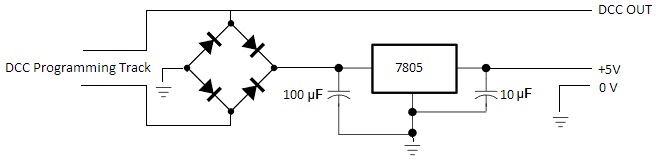
The decoder has therefore been upgraded with bigger capacitors. Paco suggests 100 uF between rectifier and 7805 voltage regulator and 100 nF on the other side of the regulator. I have changed that to 470 uF and 100 uF. And then I have added a third capacitor (100 nF) close to pin 1 on the PIC between pin 1 and ground.

JMRI – my first experience with PC software to control model trains

Now that I know where my trains are, I could get on with the software part. I decided to try JMRI. It is open source and there by kind of the DIY style.

My education as well as my profession is all about developing software. So I am pretty sure all is going to be well, even though my first experiences shows that it does not work just out of the box: The IB-COM interface/”driver” in JRMI does not reliably recieve status from my feedback module, and thereby I don’t know where my trains are anyway. And in addition, it cannot control the turnouts. But I have solved both problems and sent the corrections back to the JMRI community.

I have however not yet testet JRMI properly. I.e., I have no idea which additional problems that might pop up, before my trains are automated. But I have a feeling that there may be multiple problems hidden inside JRMI.

It is very difficult to read the documentation and thereby get an overview of JRMI. It al seems a bit – to put it nicely – half done. Just to get basic “hole through”, I had to (as already implied) to install a Java development environment including a debugger and then simply start an ordinary debugging of the software.

See also this page about my choice of software.

Summer break 2014:

Around the month of April and thereby the gardening season, I ran into a mechanical problem: I had built the servo decoders, but I could not mount the servos at my turnouts and make them work.

So no servo controlled turnouts.

Only greenhouse, lawn and tomatoes.

But decoder and servos work just fine, so I will make it work next fall.

Start soldering or just buy?

As described on the blog pages, I have decided to buy some of the electronics for my model railway and to build other parts of it myself.

The things I have bought are: The command station(s), decoders for locomotives as well as the first feedback module.

The things I am building myself are: Current sensors, next-version feedback modules, servo and thereby turnout decoders, decoders for signals, timing circuits for controlling lights etc. in houses, cars etc.

In addition, I am soldering light emitting diodes (LEDs) here there and everywhere, converting locomotives from analog to digital, building physical signals, adding interior lighting to trains and so on.

If you do not feel like soldering yourself, it is possible to buy your way out of almost all of it. Many dealers can do conversions etc., even though it does not always pay. It might be cheaper to buy a new digital locomotive than buying a second-hand analog one and getting it converted.

In addition most dealers have factory made versions of all the decoders and modules that I am building myself.

See for example these dealers:

Fyns Modeltog

nettog.dk

lokdoc.dk

NiceLED (som ikke er en rigtig modeltogsbutik)

Gentofte Togcenter

Togdillen

Kystbanen

If you want to build electronics, but only by assembling kits including full instructions and all components, you could take a look here:

Litra.dk

Sven Brandt

If yoy want todo as I do and solder from the beginning and do a little trial and error, then please feel free to get inspired at my site. And I still recommend that you have a look at the two links above as well as the two below:

Paco’s Official Website

Banetjenesten Aps

Regarding the command station, there is an in-between option utilizing standard hardware and open source software. See the DCC++ project.

2014 part 2 – First prototype railroad

 So far, I have not obtained permission to reserve any real space for my model railroad. So I am starting out with a small piece of chipboard, that fits under a bed in the guest room. Not big enough for anything that in any way looks real. But big enough for an oval with a siding, so that I can prototype the technical stuff.

My first purchases:
1. Uhlenbrock IB-COM (Gentofte Togcenter)
2. Uhlenbrock LocoNet feedback module for 3-rail track (Gentofte Togcenter)
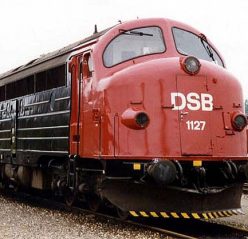
3. Märklin BR216 German diesel locomotive (Lokdoc.dk)
4. Various LEDs, 555 timers, rectifiers, 7805, 7812 etc. and not least a great big motherfucker transformer, that was quite a lot cheaper than the one Uhlenbrock and Gentofte Togcenter probably thought I should have bought (Mouser.com)

Processed with Snapseed.

Picture of the new locomotive

LEDs etc. is just a basic supply of components that is to be used for houses, rebuilding rolling stock, and many other purposes. But right now (october 2014) they are all kept safe in their bags. Some components have already become useful.

I have been bying chipboard in Silvan, that I through quite an effort has turned into a piece of furniture that fits under the bed. Until further, it has had it’s place in the livingroom, where I assume it is going to stay until it must give way for the Christmas tree anno 2014 and the Christmas train.

I have built a protype railway on this furniture, so that I can start my work with electronics and computer control.

A simple oval with a few sidings – built with my old metal track (Märklin M-track).

The very basics work. I had a little trouble getting the Uhlenbrock software to run on Windows 7 64-bit. But Uhlenbrock support was quick to help me out, so it was less than a week before the new locomotive was chuffing around the oval:

Processed with Snapseed.

Oval with metal tracks

2014 part 1 – Plans

Now it is decided: I am going to build a real railway. And guess what: The re-usability of the old railway set is soon to show itself to be just around 0%.

Before I can really get started, the technical bits must be settled.

The big dream is a computer controlled railway with automatically running trains, but where I can control one of the trains manually simultaneously.

Does computer control require a digital railway? Not necessarily. Theoretically an analog railway divided into isolated pieces of track can be controlled via analog I/O modules in a computer. That way, at least DC motors in locomotives can be controlled.

I did not dive very deep into that idea though. It is probably both easier and cheaper to go mainstream and digitalize. Later, I found out that digitalization means isolated pieces of tracks as well as DC motors in all locomotives anyway. But that is a different story.

I started out by visting a few dealers and by surfing a lot on the Internet. The were many considerations about DIY stuff or buying factory made digital equipment.

I soon decided to buy a factory made command station from Uhlenbrock and to build the accesory decoders myself.

I chose an Uhlenbrock IB-COM, because the price is not much higher than that of a kit and far less than any command station with display etc. In addition, it has Loconet, which I thought I would be using for feedback, because I had heard much bad about instabilities of S88. If need be, the IB-COM is also equipped with S88.

I only have one seriously bad thing to say about the IB-COM: programming of non-DCC decoders does not work. With some Märklin MFX decoders, you will get “fehler” 9 out of 10 times when trying to read a CV value. And the solutions described for Intellibox on the Uhlenbrock homepage do not work for IB-COM.

I have no idea whether other command stations are just as bad on that area. But at a convenient time and once I get more experience with different decoders, I think I am going to complain to Uhlenbrock support.

Post script: I have later on eliminated the problems with the MFX decoder by disabling all protocols except DCC in the decoder. That is possible in the socalled nachrüstung decoders from Märklin. But it is not possible in locomotives produced as Märklin MFX locomotives (unless of course a different decoder is being put into the locomotive).

I am still having a bit of trouble programming my DIY accessory decoders that I am using for turnouts. The problem is, that they are not able to consume enough power from the programming track. And that is how a decoder replies back to the command station during programming: It pulses with power consumption.

2013 – The Beginning

The past 3 years, my train set had been running around the Christmas tree. So after Christmas 2013, I decided that the old train, which I have owned since childhood (bought second hand around 1970, but probably much older than that – from the fifties or sixties) shall be used to build a real model railway.

But even so, it still also runs around the Christmas tree every year:

img_1099

Christmas train (and tree) 2013

Originally, I had a Fleishman set running on a large piece of chipboard, which was painted green. Later, the Fleishman set was sold and substituted by the previously mentioned Märklin set with M-track, a few houses from Heljan, the classic Märklin 3000 steam machine, another slightly bigger steam machine as well as an American Santa Fe diesel locomotive plus a few railway cars.

There were lights in the houses. The entire house. Not only the windows. Even the roofs were lit. But I do not recall any other kinds of prototypicalities.

A small comment: The shift away from Fleishman happened because my father got tired of cleaning track.

When one lubricates the locomotives as well as I did, Märklin’s 3rd track for power is the optimal solution, even though the natural looks of Märklin M-track is a story that can be told very fast indeed.

But the need for frequent track cleaning disappeared, which made my father happy. And I did not care much about the looks those days anyway.

Translate »